5 Beginner-Friendly Bioinformatics Tools to Get Started With
New to bioinformatics? Discover 5 beginner-friendly tools — Galaxy, Biopython, IGV, UGENE, and Rosalind — to start your journey with confidence.
 Sheetal
Sep 9, 2026 12:44
17
0
Sheetal
Sep 9, 2026 12:44
17
0
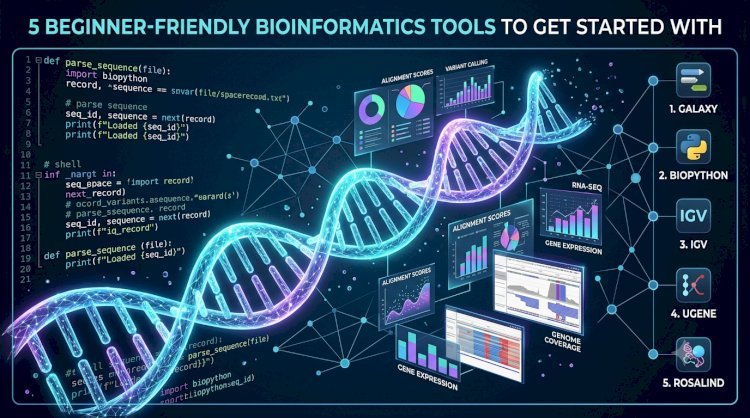
5 Beginner-Friendly Bioinformatics Tools to Get Started With
Getting into bioinformatics can feel overwhelming command lines, file formats, and a dizzying list of tools that all seem to assume you already know what you're doing. The good news: several widely used tools were built (or have interfaces) specifically to lower that barrier. Here are five good starting points for anyone new to the field.
1. Galaxy
Galaxy is a free, web-based platform that lets you run bioinformatics analyses alignment, variant calling, RNA-seq, and more through a graphical interface instead of the command line. You upload your data, pick a tool from a menu, set parameters through a form, and run it. No installation, no scripting required to get started.
Why it's beginner-friendly: It removes the two biggest early hurdles installing software and learning command-line syntax while still teaching you the logic of a bioinformatics workflow (input → tool → output).
2. Biopython
Once you're ready to write some code, Biopython is one of the gentlest entry points. It's a Python library built specifically for biological data parsing sequence files, querying databases like NCBI, working with alignments with clear documentation and a huge base of tutorials, since Python itself is widely taught and beginner friendly.
Why it's beginner-friendly: If you already know a little Python (or are learning it anyway), Biopython lets you apply that directly to real biological problems instead of learning a specialized language from scratch.
3. IGV (Integrative Genomics Viewer)
IGV is a free desktop (and web) tool for visualizing genomic data alignments, variants, gene annotations by simply loading files and scrolling/zooming through the genome like a map. It's often one of the first tools new bioinformaticians use because it makes abstract file formats (BAM, VCF, BED) suddenly visual and intuitive.
Why it's beginner-friendly: Seeing your data on a genome browser makes concepts like read coverage, variants, and gene structure click in a way that staring at raw text files never does.
4. UGENE
UGENE is an all-in-one desktop application that bundles many common bioinformatics tasks sequence alignment, primer design, phylogenetics, NGS data analysis behind a single graphical interface. It's a good "Swiss Army knife" for someone who wants to explore several types of analysis without installing a dozen separate command-line tools.
Why it's beginner-friendly: One consistent interface across many tasks means less context-switching while you're still learning what each type of analysis even does.
5. Rosalind
Not a data-analysis tool, but a learning platform: Rosalind teaches bioinformatics through bite-sized programming problems rooted in real biological questions (e.g., "count nucleotides in a DNA string," "find a motif in DNA"). It's a popular way to build coding skills and bioinformatics intuition side by side, at your own pace.
Why it's beginner-friendly: It breaks the field into small, solvable problems instead of throwing you into a full pipeline on day one good for building confidence early.
A suggested path: start with Galaxy or IGV to get a feel for what bioinformatics analyses actually do, work through some Rosalind problems to build coding comfort, then move into Biopython once you want more control than a GUI tool gives you. From there, the more advanced pipeline tools (Nextflow, Snakemake, etc.) will make a lot more sense.
Which tool did you start with? We'd love to hear what worked for you.